The short version
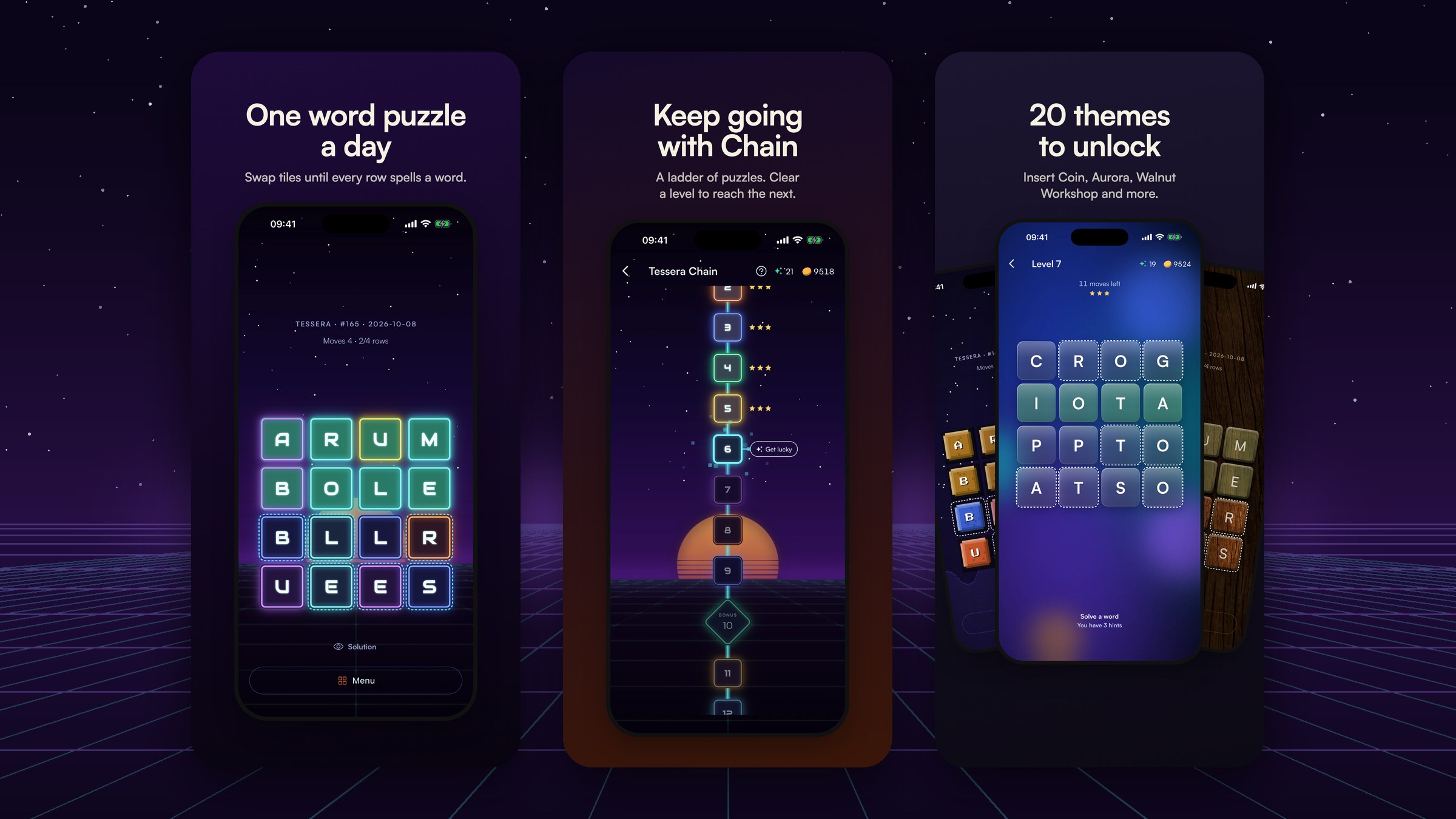
Tessera is a daily word puzzle. Every letter is already on the board, just in the wrong place. You swap two tiles at a time until every row spells a word, in as few swaps as you can.
I started it on 28 April 2026 as a page on my portfolio site. On 11 October it was a free app on the App Store and Google Play, with a website that hands players to the app, a daily email, automated social posts, a press kit, four paid ad channels and a dashboard that tells me what all of it costs.
I'm a product designer and design engineer. I did this on my own, under my company, Cooper Banfield Ltd, with Claude Code as a constant collaborator.
And I did it on the side. For most of those 168 days I was working full time as a consultant, AI strategist and forward deployed engineer at Vitality. Tessera got whatever time was left: a sprinkle here and there. We also moved house in July, which took me out completely for six weeks. So this isn't a story about grinding on one thing full time. It's about what's possible in the gaps, if every hour you do get counts. This playbook is the long version of how: what I built, the order I built it in, the decisions that mattered, the traps I fell into, and the systems I'd copy for the next one.
It's written for people like me: designers and builders who can see the whole product in their head and want to know whether one person can actually ship all of it now. The answer is yes, if you work in a particular way. Most of this playbook is about that way of working.
What I built, in numbers
168
days, sketch to app stores
312
commits on main
80%
commits co-written with Claude
87%
signed-in players still solving after a week
| Measure | Number |
|---|---|
| Days from first commit to app launch | 168 (28 April to 11 October 2026) |
| Commits on main | 312 squash-merged (638 including branch work) |
| Pull requests | 97 |
| Commits co-written with Claude | 250 of 312 (80%) |
| Platforms | Web, iPhone, Android |
| Languages | English and Spanish |
| Themes | 20, plus Classic |
| Test files | 141 (66 TypeScript, 75 Dart), plus golden image tests |
| Possible puzzles | 653,337 grids from 1,920 everyday words: about 1,789 years of daily puzzles |
| CI cost per change | Cut from about $1.86 to $0.33 |
| Paid launch budget | £1,000 across four channels for month one |
And the number I care about most: of players with an account, 87% were still solving a week after their first puzzle, and 74% three months later (156 players, measured from the database, not an analytics tool). Those are signed-in players, so the figure flatters the average; a player who bothers to create an account is already keen. It's still the signal that told me this was worth taking to the app stores.
How I worked with AI
This is the section people ask about, so here's the honest version: AI didn't build Tessera. It let one person, working around a full-time job, run a product team's worth of work without dropping the parts that usually get dropped. When you only have a few hours here and there, the biggest win is picking up exactly where you left off: the spec, the memory notes and the checklist meant no session started from a blank page.
The outcomes:
- Specs existed before code. The Flutter app started as a written spec with a decision log, reviewed twice (once from seven perspectives, once with fresh eyes), with acceptance tests written per phase before the phase was built. The levels-and-coins economy had a simulator before it had a screen. The web launch plan ran to 1,669 lines with a decisions table I signed off line by line.
- Decisions were measured, not argued. The economy simulator (2,000 simulated players, then parameter sweeps) reversed three of my design decisions: payouts were halved, a star gate I'd built was switched off, and hints were capped. Theme legibility was measured against contrast thresholds in tests, not eyeballed. The app icon's corner was measured from a simulator test icon, not guessed from Apple's docs.
- Small, reviewable steps. Work happened on branches, in small local commits, each one checked before the next. Nothing pushed without my say. The commit messages explain why, including when the AI got something wrong: one reads "described both as done. The render is what caught it, again."
- Institutional memory. Claude kept around 30 short memory notes: account IDs, which signing certificate never to use, how App Store Connect's hidden blockers show up, that I never want pink in the UI. Each new session started knowing what the last one learned.
- The boring parts got done. Privacy manifests, App Privacy tables rebuilt from each SDK's own declarations, consent flows, data export, account deletion with a grace period, a data protection log, press releases with every figure sourced. These are the things a solo builder skips. They're also the things App Review, regulators and journalists check.
- Browser control, not just code. With browser control, Claude worked in my own logged-in Chrome: building ad campaigns in Meta and Apple Ads, filling in App Store Connect and Play Console, setting up email workflows in Loops, and reading dashboards to check what had actually happened. Where a console wouldn't load for automation (X Ads, Reddit Ads), it handed me exact click paths instead. It never clicked Publish, Send or Pay: those stayed with me.
The models changed under me as I went (from Opus 4.7 in April to Opus 5.5 by launch). The way of working didn't, and that's the bit that transfers.
How to copy it:
- Write the spec first, with a decision log. Ask the AI to review it from several perspectives before any code.
- Ask for measurements, not opinions: a simulator, a contrast test, a query against real data.
- Work in small branches and approve each step. Never let anything push or publish without you.
- Keep a memory file of facts and rules. Correct it when it's wrong.
- Use it for the unglamorous work: compliance, docs, release checklists, runbooks.
- Let it drive the browser for console work, but you click Publish, Send and Pay.
Phase 1: a web game in a month
28 April to 28 May. 170 commits in May alone.
The first version lived inside my portfolio site. On day one I pulled it into its own Next.js app, added a canonical URL, a manifest and a sitemap, and put it on Vercel. Within a month it had:
- Analytics from day two, through PostHog, with a reverse proxy on my own domain. Ad blockers were costing 30 to 50% of events without it.
- A stats dashboard on PostHog's query API, later moved to its own subdomain with precomputed metrics.
- Sharing: an emoji grid like Wordle's, short share URLs, and a per-solve Open Graph image so a shared result looks like something in a feed.
- Email: a sign-up for a daily reminder, sent by a cron job through Loops.
- Dark mode and Spanish, with a Spanish word list, generator and definitions.
- Web push and an install banner.
- Hard mode on a 5x5 grid, and an exact solver for the minimum number of swaps, so every result could be graded fairly.
- A daily social bot posting to X, Facebook, Bluesky and Instagram.
- A consent banner, privacy policy, cookie policy and terms.


01 / The web game
The step-by-step:
- Ship the smallest playable version on a real domain in the first week.
- Add analytics before you need it, proxied through your domain.
- Make sharing beautiful early: the share card is your first marketing.
- Add one habit loop (a daily email or push) as soon as people come back.
- Calibrate difficulty from real data. Tessera's tiers were set against about 290 real solves.
- Get the legal basics (privacy, cookies, terms, consent) in place before you add any marketing pixels.
What players taught me: players misread the first demo as "only adjacent tiles can swap". The demo changed three times (non-adjacent swaps, then diagonal-only, then a self-solving start screen) before a 2x2 practice round finally made it obvious.
Design: a system, not a style
Tessera's look changed several times. What made that cheap was treating design as a system with rules, tests and tokens.
On the web: paper, ink and cream neutrals, green for a correct row and rust for solved. Gold was replaced by rust in May. The hint outline went from 1px solid green to 2px dashed to 3px ink and back to 2px when 3px "felt too heavy". One rule never changed: no pink.
In the app (docs/mobile-visual-system.md): Satoshi as the only typeface, a 4 and 8 point spacing scale, tile letters at 42% of the tile size, a colour-blind palette (blue and orange), and motion values written down (a 200 ms swap, a 70 ms stagger on the solve cascade). It also has a "distinct from Wordle" section, written as a defence against App Store guideline 4.3 (copycat apps).
Themes: 20 sellable themes, from Walnut Workshop and Carrara marble to Night Drive and Insert Coin. Each has its own fonts, textures and tile art. Every theme has to pass automated legibility tests: large-text contrast, greyscale separation and texture contrast under every part of a tile. Tile colours are salted per puzzle so a colour never hints at where a tile belongs.


01 / Daily

02 / Chain

03 / Themes
Brand: the icon went through four rounds, ending as a neon T over a violet sun ("Night Drive"), with its corner fitted to a measured iOS mask. Share cards were rebuilt in the Night Drive style for launch. The 3D perspective on them is projected by hand, because the image renderer has no 3D transforms.

Store assets are rendered, not designed. A script takes raw simulator screenshots and renders the framed store screenshots for every required size, plus Play's feature graphic. Changing a caption is a re-run, not an afternoon in a design tool.

01 / Raw capture

02 / Rendered
Ads follow written rules. The approved ad style: continuous real footage of the game, no phone frame, Night Drive full-bleed, a white cartoon glove for taps, one orange key phrase, a roomy call to action. The ads themselves are rendered frame by frame from an HTML composition.
The step-by-step:
- Write your tokens and motion values down before you build screens.
- Make legibility a test, not a review comment.
- Render anything you'll need in many sizes (store screenshots, share cards, ads) from code.
- Write your visual rules down, including what you won't do.
- Review on real devices. Many fixes in the history say "found by playing it".
Front end and game engineering
The puzzle. Each day's grid is a 4x4 word square found by a backtracking search over a 2,000-word list, seeded by the date, then scrambled with checks so no row or column starts solved. Spanish and the 5x5 Hard mode use the same engine with their own lists.
Generated on the server. The app and the website ask the server for today's puzzle. The word lists stay out of the app, the result is cached at the edge, and shared fixtures prove the web and app code produce the same grid for the same seed.
Fair grading. The minimum number of swaps is solved exactly, as a cycle problem on a graph of letters. The first version took 27 to 38 seconds on some Hard puzzles in production. The rewrite takes milliseconds and matched every one of 668 dated puzzles.
Never change the past. A daily puzzle is a promise: puzzle #47 must always be puzzle #47. So word blocklists only apply from a cutover date, and filters run at generation time instead of editing the list. Deleting one word would have changed every puzzle ever played.
Streaks you can trust. Streaks are derived from results, never stored as a number. The server replays each solve's swap history to verify it, and a verified result outranks an unverified one when devices sync.
Tests. Vitest on the web from week two, Flutter tests in the app, golden image tests for the board and share cards, and integration tests against a real Postgres. One proves that ten simultaneous 25-coin purchases against a balance of 100 coins let exactly four through.
Back end: accounts, sync and an economy you can't cheat
Accounts arrived in June behind a feature flag and launched by flipping it: cross-device sync, global and country leaderboards, and private leagues with invite codes. Data lives in Supabase (Postgres, in Frankfurt), accessed only from the server, with row-level security on and no client policies at all.
A versioned API (/api/v1) with a frozen schema serves the app: puzzle, results, account, settings, leaderboards, leagues, levels, coins, store, themes, billing and ad verification.
The coin economy is built so it can't be gamed:
- Every coin movement is a ledger row with a unique key, so a retry can never pay twice.
- Debits are conditional updates with a database check that the balance never goes below zero.
- There is no endpoint that grants coins on request. ("An endpoint that grants on request would be the economy's weakest point.")
- In Tessera Chain, the levels mode, "the client states what it did, never what it earned". The server times bonus rounds, counts rerolls and computes hints.
Config from the server. Prices, rewards, flags, the minimum supported app version and the "What's new" card all come from one endpoint, overridable from environment variables. I can change the economy, switch off ads or force an update without a release.
Account deletion with re-authentication, a 48-hour grace period and a nightly purge. Data export covers everything. Moderation: a name filter that understands leetspeak, report and block, and a review queue in the dashboard.
The step-by-step:
- Put new systems behind a flag and launch by flipping it.
- Make every money-like action idempotent and verified on the server.
- Serve anything you might want to tune from the server.
- Build deletion, export and moderation before App Review asks.
- Write a scale and cost plan from measured numbers. Mine projected 60 to 100 times the analytics volume at 10,000 daily players, and listed which levers to pull first.
Going native: one spec, one Flutter app, two stores
Nothing landed on main from mid-June to early September. That wasn't a plan. We moved house in July, which took me out for six weeks, and the rest of the time my day job came first. When I picked Tessera back up in September, I started with the app spec, and the Flutter app plus the versioned API arrived as one large, carefully staged change: 280 files, 33,000 lines, built in phases on branches, each with acceptance tests written first.
Then, in three days:
- Coins and a ledger
- Tessera Chain, an endless ladder of levels with stars and bonus rounds
- 20 themes, a theme store and in-app purchases
- First TestFlight build and first App Store submission

The step-by-step:
- Write the app spec against the web product that already works.
- Move puzzle generation to the server so both clients share one source of truth.
- Build in phases, each with tests that define "done".
- Keep one source for UI strings and copy them into the app, with a CI check that fails if they drift.
- Use flavors (dev and prod) so test builds never touch real users or money.
Authentication without passwords
Players sign in with an emailed one-time code, Sign in with Apple, or Google. There are no passwords and no magic links. The same accounts work on the web and in the app.
Tips:
- Native Google sign-in with Supabase needs nonce checks switched off for that provider.
- Play's app-signing certificate (not your upload key) must be registered on the Google OAuth client, or Google sign-in fails only in the Play build.
- App Review can't receive your one-time codes. Tessera has a single password-only review account for exactly that reason.
- If your API redirects from the bare domain to www, call www directly from the app: the redirect drops the authorisation header.
Payments, coins and ads
- In-app purchases through RevenueCat: three coin packs and an "every theme" unlock. Its webhook is treated as a prompt to re-check, never as a trusted write, and the server answers "try again" when it can't verify.
- Rewarded ads only. Banners and interstitials were removed. Players choose to watch an ad for coins, three a day, verified by a server-side callback from AdMob, with a remote kill switch.
- Consent on the first tap of the ad offer, not at launch, through Google's consent tool and Apple's tracking prompt.

Traps I hit:
- AdMob's test ads never fire the server callback. The only proof that rewards work is a real release build producing a ledger row.
- An "every theme" purchase unlocks nothing until the product is attached to the entitlement in RevenueCat.
- Coin packs transfer between accounts with the purchase. Credit each purchase once, across all accounts. One real purchase paid out to three of my own test accounts before I fixed it.
- Removing an ad format silently removed the only caller of the consent flow. Log every place your code quietly gives up.
Getting through App Review and Play
The first submission went in on 23 September. iOS 1.0 went live on 2 October, after:
- A withdrawal, because the first in-app purchases have to go to review with the first version, and I'd left them off.
- A request for information (a screen recording, and a way for players to block each other).
- A Beta App Review rejection for not providing a demo account for an app that only signs in with codes.
What I learned about App Store Connect:
- Your bundle ID can be taken by another team permanently. Same on Play for package names. Use a company-namespaced ID from the start.
- Some blockers only appear as hidden errors when a submission fails: pricing not set, privacy policy URL missing, a screenshot stuck processing.
- Some steps only work in the browser: publishing App Privacy answers, attaching first in-app purchases, finalising screenshots.
- App Privacy answers must be published, not just saved.
- After a rejection, in-app purchases stay attached to the old submission. Remove them there first.
- Build your App Privacy table from each SDK's own privacy manifest. Mine had three errors until I did.
- Reporting must be visible (not hidden behind a long press), and blocking is expected for any app with player names.

01 / Stars

02 / Stats

03 / Chain map
On Play: the developer account had to be an organisation (which needed a D-U-N-S number), version codes can never be reused, and "managed publishing" must be on before approval or your release goes live the moment it's approved.
CI/CD on a budget
Four jobs check every change: web (types, tests, build, lint), Flutter (string sync, analysis, tests), an Android debug build, and golden image tests on macOS.
The cost lesson: on a private repo, macOS minutes cost ten times Linux. The iOS simulator build was about 70% of the whole Actions bill. Moving it to path triggers, skipping goldens on main and triggering on the lock file instead of the version file cut the cost of a change from about $1.86 to $0.33. A version-bump-only change had been costing $1.04 by itself.
Other fixes:
- The linter was checking every copy of the repo in my worktrees (45,027 problems), hiding 13 real errors.
- Android builds ran out of disk on the CI runner until unused toolchains were deleted first.
- Golden images are rendered on macOS, so they're excluded from Linux runs.
Releases are built locally. iOS: flutter clean before every archive (or a simulator slice ships), manual export with a downloaded profile, upload through an API key, validate first. Android: an app bundle signed with a keystore that lives only on my machine and in my password manager.
The website deploys on every merge through Vercel, with a preview for every branch. The app launch was an environment flag and a redeploy, with instant rollback ready.
Watching it run
- Sentry for crashes in the app and errors on the server, with personal data off, no tracing and 30-day retention. iOS symbols needed the dSYM files, because the other symbol files have an all-zero ID.
- PostHog for product analytics: cookieless on the web until a player consents, opt-in only in the app, and tied to an anonymous ID, never the account ID.
- Postgres for the numbers that matter: retention and the economy are measured with scripts against the real database, not inferred from analytics.
- A dashboard of my own at
stats.tesserapuzzle.com: overview, daily, puzzles, players, cohorts, accounts, notifications, reports, health and, since launch, marketing.
The marketing page shows:
- every store click through my own redirect, counted on the server so it doesn't depend on cookie consent
- visits and store taps by source
- App Store and Google Play installs from the stores' own reports
- ad spend, synced each morning from Apple Ads and Meta, with a verdict per channel against the guardrails I set before launch


Metric honesty fixes worth copying: count a visitor if they viewed a page or started a puzzle, because blockers hide page views (engagement had read over 100%). And watch for query functions that fail silently and return zero.
Privacy and compliance
The basics: a consent banner that gates every marketing pixel, cookieless analytics by default, privacy and cookie policies, a just-in-time notice where emails are collected, and in the app, consent, tracking and analytics all opt-in.
The company is a limited company registered with the ICO, and every third-party asset is credited in a NOTICE file. Some fonts forbid redistribution, so they could only be committed once the repo went private.
Automated marketing: the website that markets itself
- A daily social bot posts the day's puzzle at 07:17 UTC to X, Facebook, Bluesky and Instagram. Vercel Cron triggers it, with a GitHub Actions backup and a lock so it never posts twice. Each platform gets its own tracking tags.
- Share cards generated per solve and per day, so every shared result is an ad.
- SEO: canonical URLs, sitemaps, Spanish alternates, and an App Store name chosen for search ("Tessera: Daily Word Puzzle").
- A blog and press kit on the site, with a downloadable kit and sourced figures.
- Share loops in the product: a challenge-a-friend link, league invites that open the app.
Platform quirks: X caches preview images by image URL, so put the date in it. Instagram's publishing API fails unless you poll until the media is ready. GitHub's scheduled jobs run late at busy times.
- A daily reminder to everyone who signs up: a cron job fires one event per subscriber into a Loops workflow, which branches by language. Loops has no list endpoint and one-shot campaigns, so per-contact events were the way to send a daily email.
- Rate limits are real. The first fan-out sent about 12 of 230 emails before hitting the limit. The fix: send one at a time and retry on "too many requests".
- Renaming an event the email tool listens for silently stops every send.
- The launch email, "Tessera is now on iPhone and Android", went to the reminder list, with the store badges going straight to each store through tracked links.


Press
- A press release where every figure is sourced to a query or a document.
- A press kit at
/press: release, screenshots, icons, header, trailer and a downloadable zip. - 29 checked targets, 20 with a public email, each drafted as an individual pitch with its own tracked link so I can see which outlet sent players.
- Pitches sent in small batches over the first two days of launch.

Paid marketing on £1,000
The plan for month one:
| Channel | Budget | Job |
|---|---|---|
| Meta video (Instagram, Facebook) | £300 | Awareness: show the swap to people who've never seen it |
| TikTok video | £200 | Awareness, younger audience (a 10-day burst, because of TikTok's daily minimum) |
| Apple Search Ads UK | £350 | Catch searches, including people who saw a video |
| X video | £150 | Awareness; X worked for the web version |
Video ads land on the website (one free puzzle, then the stores), not on a store page.
Guardrails, agreed before launch:
- Ceilings: £3 per install for Apple Search Ads, £1 per store tap for the social channels.
- Stop rule: once a channel has spent £100 or run 7 days, stop it if it's more than 50% over its ceiling, and halve it if it's up to 50% over.
- Retention rule: stop any channel with no player still playing a week after installing.
- Discipline: one change a week per channel, at a weekly review.
Attribution without an attribution SDK. Every store link goes through my own redirect, which counts the click on the server and adds the App Store campaign token or the Play referrer. The app reads Play's install referrer once, and RevenueCat collects Apple's search ads token. Campaign tokens are kept short and few, because Apple only shows a campaign once it has five downloads.
What it took to set up: a Meta pixel and server events, an X pixel, a TikTok pixel (all behind consent and the launch switch), four ad accounts, billing verification, a business portfolio, a TikTok Spark Ads identity, and API credentials so spend flows into the dashboard. Each console has its own traps. Apple Ads hides the campaign start date under a collapsed link. TikTok has a £20 daily minimum per ad group. Meta needs a system user with an app that has the ads use case before it will issue a read-only token.
Launch day
Launch was a sequence, not a moment:
- 8 October: version 1.0.1 submitted to both stores.
- 10 October: Android published as a soft launch; iOS released that afternoon.
- 11 October: the website switched over with one environment flag and a redeploy. The game now gives each visitor one free game before pointing them to the app, with store badges, new share cards, a new icon, and pixels that load only with consent. The in-app "What's new" card went live. The daily email, launch email, ads and press followed.
The launch checklist lived in one shared page with an owner on every item (me or Claude), ticked off as we went.
18 tips I'd give anyone doing this
- Reverse-proxy your analytics. Ad blockers cost 30 to 50% of events.
- Count visitors as page views or gameplay events.
- Set your canonical host to www everywhere: preview images, the app's API base, webhooks.
- Put the date in share image URLs; X caches by image URL.
- Use one source for UI strings and fail CI when the app's copy drifts.
- Never edit a seeded word list in place; apply changes from a cutover date.
- Pick company-namespaced bundle and package IDs on day one.
- On a private repo, macOS CI minutes cost ten times Linux. Trigger iOS builds by path.
- Exclude your worktrees from the linter.
- Build a password review account if you sign in with codes.
- Make reporting visible and add blocking before App Review asks.
- Turn on managed publishing on Play before approval.
- Upload dSYMs to Sentry; iOS symbol files have a zero ID.
- Prove rewarded ads with a real release build; test ads never call back.
- Treat payment webhooks as a prompt to re-check, never as truth.
- Gate every tracking pixel behind consent and your launch switch, and check what live code does with a key before you add it.
- Let your guardrail windows start on a channel's first day of spend, not the day you started syncing.
- Keep one list of everything you still owe each console, and a checklist from every painful release.
What I'd do differently
- Separate the dev database from day one. Preview deploys shared production at first and filled it with test data.
- Reserve IDs early: bundle ID, package name, D-U-N-S number, company. Each one blocked work later.
- Gate tracking on the launch switch from the start, not the week before.
- Put the economy in a simulator before building the screens. It reversed three decisions I'd already built.
- Plan for review accounts and moderation as part of accounts, not as App Review fixes.
If you want to do this yourself
- Week 1: a playable web version on a real domain, analytics, a share card.
- Weeks 2 to 4: one habit loop (email or push), difficulty calibrated on real data, consent and legal basics.
- Month 2: accounts behind a flag, sync, leaderboards. Measure retention from the database.
- Before the app: write the spec, move generation to the server, decide the economy in a simulator.
- The app: build in phases with tests first; dev and prod flavors; server-driven config.
- Before submitting: privacy manifest, App Privacy from the SDKs' own declarations, deletion, export, report and block, a review account, IAPs attached.
- Before launch: a press kit with sourced figures, tracked links for every outlet and channel, ad guardrails written down, a dashboard that shows clicks, installs and spend together.
- Launch as a sequence, with one checklist and an owner on every line.
Play Tessera
Tessera is free on iPhone and Android. A new puzzle every day, the same for everyone.


Work with me
I'm Paul Cooper, a product designer and design engineer. If you want a product taken from zero to one like this, or want your team working this way with AI, get in touch. You can also see my AI automation projects and AI design workshops.